Shabab Browser Bot
Run many separate browser profiles from one dashboard on Windows.
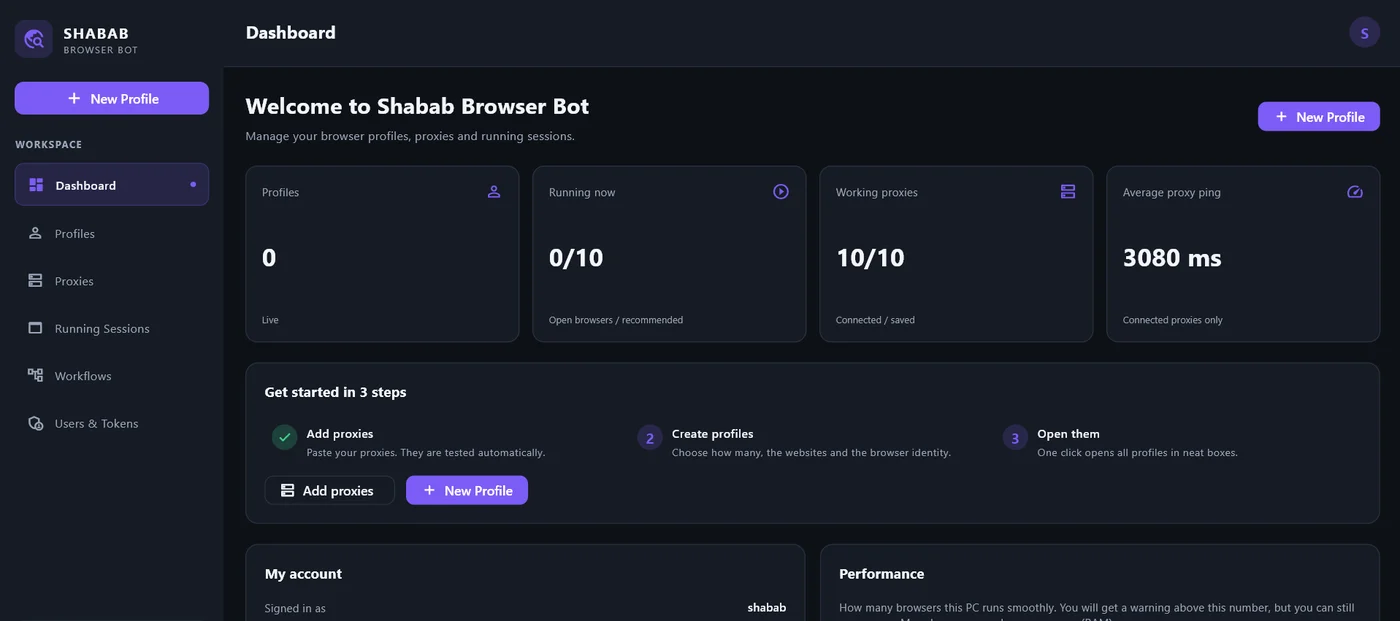
What it does
Bulk profiles
Create many profiles at once. Choose the browser per profile or for the whole batch.
Proxy manager
Import HTTP, HTTPS and SOCKS5 proxies, with or without login. Test each one for country and speed.
Own fingerprint
Each profile keeps its own stable fingerprint: user agent, screen, language and timezone.
Automatic sessions
Give a profile a list of pages. It opens them, scrolls, stays on the one you pick and can close on a timer.
Phone-style profiles
A profile can look like a phone: small, header-less, in tidy rows on your screen.
Window layout
Pick how many browsers or phones fit on screen. The app sizes and places them for you.
Cookie import
Paste cookies (JSON or Netscape) into new profiles. Cookie banners are accepted automatically.
Private accounts
Each user sees only their own profiles and proxies. Data stays on your PC.
License protected
Plans have an expiry date and a device limit. Renew on WhatsApp, no reinstall.
Each open browser uses memory and CPU. How many you can run at once depends on your PC; the app shows a warning, never a hard stop.
How to use it
Install and sign in
Run the setup file and open Shabab Browser Bot. On first start it downloads a browser component, so keep your internet on. Sign in with the username, password and token you get on WhatsApp.
Add proxies
Open Proxies and paste a list, one per line: host:port, host:port:user:pass, user:pass@host:port or socks5://user:pass@host:port. Press Check to test them.
Create profiles
Choose how many, the browser, the proxies, the pages to open, how long each runs, and how many appear on screen.
Launch
Select profiles and press Launch. They start one by one and sit in a neat layout. Use Stop all when you are done.
Pricing
Choose a plan and a WhatsApp chat opens with it already written. Prices are in Pakistani Rupees.
Need more than 5 laptops? Ask on WhatsApp.
Windows installer
Version , for Windows 10 or 11 (64-bit).
Download ShababBrowserBot_Setup.exeYou also need a license to sign in. Get one on WhatsApp.
Before you install
| Memory | 8 GB or more recommended |
| Disk | About 1 GB free, plus space for profiles |
| Internet | Needed to sign in and for the first-start download |
Install in 5 steps
- Click download. If Chrome or Edge says the file isn't commonly downloaded, open the warning and choose Keep. This is normal for a new app.
- Double-click the setup file. If Windows shows Windows protected your PC, click More info, then Run anyway.
- Click Next, then Install.
- Open the app and wait 1 to 3 minutes while it downloads its browser component.
- Message me on WhatsApp for your username, password and token, then sign in.
To update, run the newest setup file. Your profiles and proxies stay on your PC. To uninstall, use Windows Settings, then Apps.
Questions
When does my plan start?
Your plan is counted from license activation. The app shows the exact expiry date.
Can I use one license on two computers?
A single license works on one computer. Team licenses cover up to 5. Ask on WhatsApp.
What happens when my plan ends?
The app locks itself. Message me to renew and it works again. No reinstall, and your profiles stay on your PC.
Can I change my plan later?
Yes. Message me and I will extend or upgrade your license.